
Download Tomato Torrent – Lightweight, Stable BitTorrent Client for macOS
Overview
Tomato Torrent is a minimalist BitTorrent client built specifically for macOS users who value stability, low‑memory consumption, and an uncluttered interface. Derived from the original BitTorrent client codebase, Tomato Torrent inherits the rock‑solid reliability of its predecessor while shedding unnecessary bloat. This makes it an ideal choice for anyone who wants to keep a torrent client running quietly in the background without sacrificing system performance or draining bandwidth.
The program’s hallmark is its “quick‑resume” capability, which instantly restores paused downloads, and a built‑in tracker creator for users interested in distributing their own files. Although it does not pack the advanced analytics found in Azureus or the sophisticated scheduling of newer clients, Tomato Torrent strikes a balance between simplicity and essential functionality. It supports AppleScript integration, enabling power users to automate tasks and tailor the client to unique workflows.
Whether you’re a casual downloader looking for a hassle‑free experience or a developer who wants a lightweight foundation for custom torrent solutions, Tomato Torrent delivers a straightforward, secure, and free tool that runs smoothly on modern Mac hardware.
Key Features
- Low Memory Footprint: Consumes only a few megabytes of RAM, allowing simultaneous operation with other demanding applications.
- Quick‑Resume Function: Instantly restores paused torrents without re‑checking already downloaded data.
- Seed Ratio Control: Automatically stops seeding once a user‑defined ratio is reached, helping conserve upload bandwidth.
- Custom Upload Rate: Manually set maximum upload speeds to prevent saturation of your internet connection.
- Built‑In Tracker Creator: Simple interface for generating private trackers, ideal for small‑scale file distribution.
- AppleScript Support: Full scripting capabilities for automation, batch processing, and custom UI extensions.
- Native macOS Interface: Classic BitTorrent‑style layout adapted to macOS aesthetics, ensuring familiarity for long‑time users.
- Secure Download Handling: Uses verified SSL connections where available, protecting torrent metadata from tampering.
- Automatic Updates: Optional background update checks keep the client current without manual intervention.
- Free of Advertisements: No pop‑ups or bundled adware, delivering an uninterrupted downloading experience.
Installation, Usage & Compatibility
Installation Steps
Installing Tomato Torrent on a Mac is straightforward. Begin by visiting the official website and clicking the “Download for macOS” button. The file arrives as a compressed .dmg package. Open the DMG, then drag the Tomato Torrent icon into your /Applications folder. macOS may warn you about an unidentified developer; simply right‑click the app, choose “Open,” and confirm you trust the source. The installer will then complete, and the client will appear in your Launchpad.
First‑Time Launch & Basic Usage
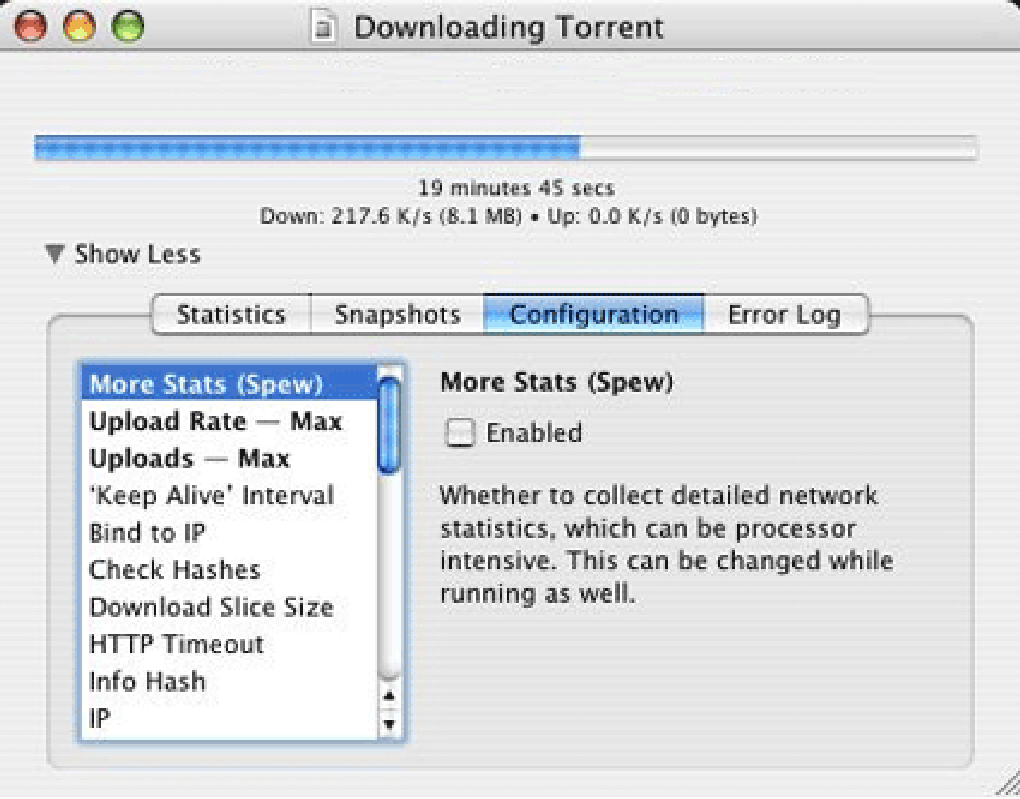
Upon first launch, Tomato Torrent presents a clean window with a “+” button for adding torrent files or magnet links. Drag‑and‑drop a .torrent file onto the window or paste a magnet URI to start a download. The main view shows progress bars, download/upload speeds, and remaining time.
Use the “Pause” button to halt a torrent temporarily; the quick‑resume feature guarantees you can pick up exactly where you left off. To adjust the seed ratio, right‑click a torrent, select “Properties,” and set the desired ratio. When the ratio is met, the client automatically stops seeding that torrent, preserving your upload bandwidth.
Compatibility (itemprop="operatingSystem")
Tomato Torrent is designed exclusively for macOS. It runs natively on macOS 10.12 Sierra and later, including the latest macOS Ventura releases. The application leverages the Cocoa framework, ensuring smooth integration with system services such as Notification Center and Spotlight. While the client does not have official Windows, Linux, Android, or iOS builds, its lightweight architecture makes it a good reference for developers aiming to create cross‑platform torrent tools. For users with older Mac hardware, the low‑memory consumption guarantees that even legacy machines can handle multiple simultaneous torrents without noticeable slowdown.
Pros, Cons & Frequently Asked Questions
Pros
- Extremely low RAM usage – ideal for background operation.
- Quick‑resume saves time and bandwidth.
- Built‑in tracker creator for private torrent distribution.
- AppleScript support offers deep customization.
- Ad‑free, free of charge, and regularly updated.
Cons
- Lacks advanced statistics and peer analytics found in larger clients.
- No native Windows or Linux version, limiting cross‑platform use.
- Interface is basic; power users may miss features like bandwidth throttling per torrent.
- Tracker creation is simple but not suited for large public trackers.
- Limited community support compared to more popular torrent applications.
FAQ (itemscope itemtype="https://schema.org/FAQPage")
Is Tomato Torrent completely free?
Yes, Tomato Torrent is offered as a free download with no hidden fees or subscription requirements.
Can I limit my upload speed?
Absolutely. Within the torrent’s properties you can set a maximum upload rate to keep your internet connection from being saturated.
Does Tomato Torrent support magnet links?
Yes, you can paste magnet URIs directly into the main window or use the “+” button to add them.
How do I create a private tracker?
Tomato Torrent includes a simple tracker wizard accessible from the “File” menu. Follow the prompts to specify port, announce URL, and optional authentication.
Is AppleScript integration safe?
AppleScript runs within macOS’s sandboxed environment, so scripts can only interact with Tomato Torrent’s exposed commands, making it a safe way to automate tasks.
Conclusion & Call to Action
Tomato Torrent delivers on its promise of a simple, stable, and memory‑light BitTorrent client for macOS. While it may not rival feature‑heavy competitors in terms of analytics or cross‑platform availability, its core strengths—quick‑resume, low RAM usage, seed‑ratio automation, and AppleScript extensibility—make it a compelling option for users who prefer a clean, distraction‑free downloading experience. If you’re looking for a free, secure, and easy‑to‑use torrent client that stays out of the way while you work, Tomato Torrent is worth a download. Install it today, set your preferred seed ratio, and enjoy seamless torrenting without the overhead of bloated software. For developers, the AppleScript hooks open doors to custom automation, turning Tomato Torrent into a versatile foundation for specialized workflows.
Ready to give Tomato Torrent a try? Download the latest version now and experience the simplicity of a truly lightweight BitTorrent client.







